ShutDown Manager
zebNet ShutDown Manager is a free tool that enables you to manage all the power options of your computer with just a click. After installing it, you will be able to access all its features directly and easily through the tray bar icon.
It is straightforward to manage all the power options of your computer by using zebNet ShutDown Manager.
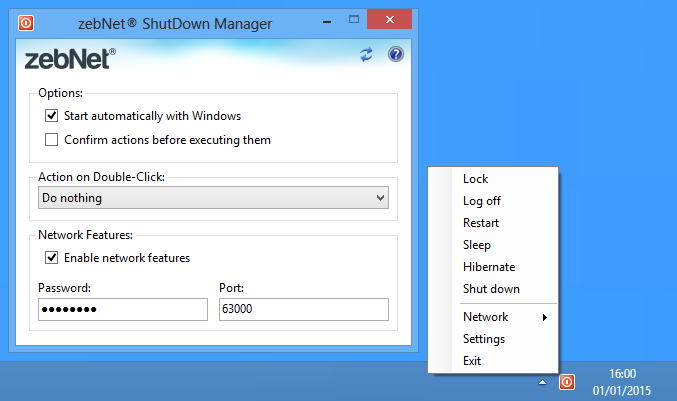
Simply click with the right mouse button on the tray icon and select between Lock, Log off, Restart, Sleep, Hibernate or Shut down. You can also specify what exactly should happen when double-clicking on the tray icon.
zebNet ShutDown Manager can automatically be started with Microsoft Windows and for security purposes, you can choose whether the action must be confirmed before executing or not.
Furthermore, zebNet ShutDown Manager also allows you to control all of your computers in your local network by simply installing zebNet ShutDown Manager on every network computer you wish to control.
Supported operating systems
- Windows 7
- Windows 8
- Windows 8.1
- Windows 10
- Windows 11
Additional Software Requirements
- Microsoft .NET Framework 4.6.2
Note: Any additional software requirement is available completely for free and will automatically be installed during the installation of the application if it's not already present on your computer.
To pobranie jest objęte naszą gwarancją bezpieczeństwa
To pobranie jest w 100% bezpieczne: bez oprogramowania szpiegującego, reklamowego ani żadnego innego złośliwego oprogramowania! Gwarantujemy to i potwierdzają niezależne certyfikaty. Twoja prywatność i ochrona są dla nas najważniejsze! (Dowiedz się więcej)